Epson Smart Panel
Seiko Epson Corporation
Preview
Overview
Core Features
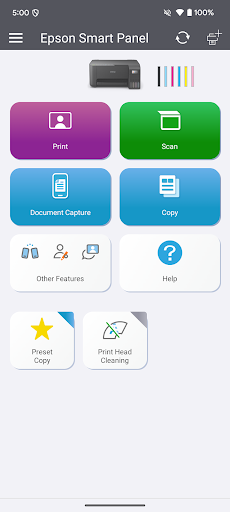
- The app features an intuitive interface that allows easy setup and management of compatible Epson printers and devices.
- Real-time scan and print job monitoring ensures users stay updated on printer status and job progress.
- Remote printer management enables users to control printers from their mobile device regardless of location.
- Advanced app features include ink level alerts and maintenance reminders to keep printers in top shape.
- The app offers seamless connectivity with Android devices, enhancing the overall app experience for on-the-go use.
- Support for multiple printer models provides flexibility and convenience for diverse printing needs.
Who This App Is For
This mobile app is ideal for small business owners, IT professionals, and home users who rely on Epson printers daily. It benefits anyone looking for a simple yet powerful app-based solution for managing printers efficiently.
Whether you need to monitor printing tasks remotely or troubleshoot issues quickly, this app enhances your app experience and streamlines everyday printing tasks in both casual and professional settings.
Why Choose This App
This Android app stands out with its user-friendly design and comprehensive app features that simplify printer management. It provides an app-based solution that saves time and reduces frustration.
By offering reliable performance and easy control, it addresses common printing challenges, making it a trusted choice for anyone seeking an efficient mobile app for printer management and maintenance.
Features
Simple device control interface for Epson products
Enhanced usability with visual shortcuts for quick actions
Fast setup and Wi-Fi configuration process
Centralized management of devices and supplies
Adaptive interface for printers and scanners
Personalized auto-configuration for seamless use
Support and maintenance tools integrated into one app
Consistent experience across all supported devices
More Information
Epson Smart Panel is a user-friendly mobile app designed to simplify the management of Epson printers and scanners. It offers an intuitive interface that allows users to easily monitor, control, and optimize their printing and scanning tasks directly from their Android devices. As an app-based solution, it enhances the overall app experience by providing quick access to essential printer features and settings without needing to use the printer's physical controls or traditional software.
👍 Pros
- Intuitive interfaceThe app offers a user-friendly layout that simplifies device setup and operation.
- Seamless device managementUsers can easily connect and control multiple Epson printers from a single platform.
- Enhanced printing functionalitySupports a wide range of printing options, including remote printing via mobile devices.
- Real-time status updatesProvides immediate notifications about ink levels, paper jams, and firmware updates.
- Customizable settingsAllows users to modify printer preferences directly within the app for personalized use.
👎 Cons
- Occasional connectivity issuesSome users experience intermittent disconnections between the app and printer, which can disrupt workflows.
- Limited support for older printer modelsThe app is optimized primarily for recent Epson printers, potentially excluding older devices.
- App crash intermittently on slower devicesOn certain smartphones or tablets, the app may freeze or crash, especially during large file uploads.
- Some features may require an internet connectionOffline printing options are limited, but users can work around this by pre-downloading necessary files.
- User interface could improveNavigation for advanced settings can be slightly confusing for new users but is expected to be refined in future updates.
Download Epson Smart Panel
You are going to be redirected to the official website to finish the download when you click these buttons above.